
Choosing the right IPTV stream player is crucial for an optimal viewing experience. With dozens of options available for different devices and platforms, finding the perfect player can transform your IPTV service from frustrating to fantastic. This comprehensive guide explores the top IPTV stream players of 2025, their features, compatibility, and expert recommendations to help you make the best choice.
What is an IPTV Stream Player ?
An IPTV stream player is a software application that decodes and displays Internet Protocol Television content on your devices. These players connect to IPTV services using M3U playlists or Xtream Codes API, providing user-friendly interfaces for channel navigation, program guides (EPG), and advanced features like recording and multi-screen viewing.
Core Functions of IPTV Stream Players:
- Content Decoding: Process IPTV streams for smooth playback
- Interface Navigation: Browse channels and on-demand content
- Playlist Management: Handle multiple IPTV subscriptions
- EPG Integration: Display TV guides and schedules
- Advanced Features: Recording, catch-up TV, and customization
Top IPTV Stream Players for 2025
TiviMate IPTV Player – Overall Champion
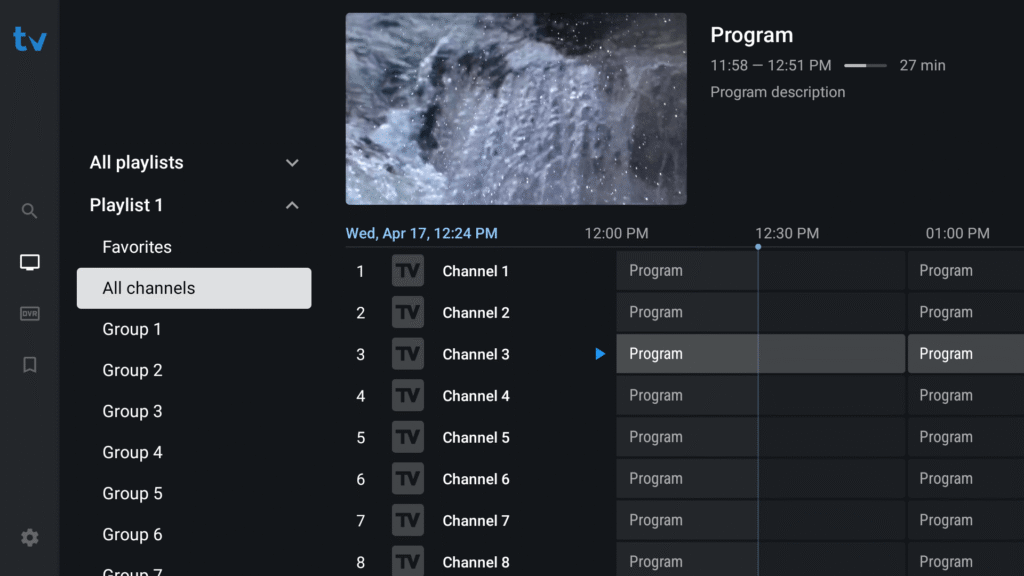
TiviMate tops our list of the best IPTV players, as it is used by millions of cord-cutters and more across the world. Made for Android TV devices, TiviMate is a simple-to-use, lightweight, and reliable IPTV player.
Customer Ratings: 4.9/5
Key Features:
- TiviMate remains the gold standard for Android TV and Fire Stick users, offering the best overall experience
- Fast channel switching (less than 2 seconds)
- Multiple playlist support with advanced EPG customization
- Scheduled recordings and DVR functionality
- Picture-in-Picture (PIP) mode
- Customizable interface with themes
- Parental controls and favorites management
Pricing: You can opt for the paid version of TiviMate IPTV Player for just $10 per year or a one-time $30 lifetime fee.
Device Compatibility:
- Android TV and Google TV
- Amazon Fire Stick / Fire TV
- NVIDIA Shield TV
- Chromecast with Google TV
- Android devices (not optimized for phones/tablets)
Premium Features Include:
- Unlimited playlists
- Recording capabilities
- Advanced customization
- No ads
- Priority updates
Best For: Android TV and Fire Stick users seeking professional-grade features and reliability
IPTV Smarters Pro – Best Cross-Platform Solution
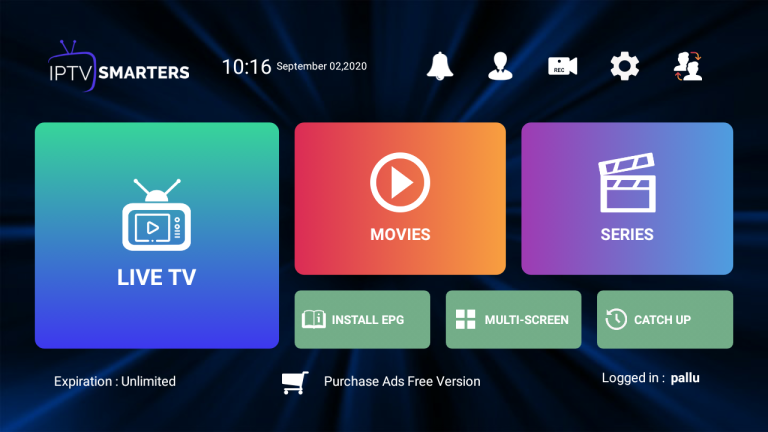
Rebranded to IPTV Smarters Pro from IPTV Smarters after some trouble with the law, this player has been around for quite a while. IPTV Smarters Pro provides the most consistent cross-platform experience for multi-device households.
Customer Ratings: 4.7/5
Key Features:
- IPTV Smarters Pro’s iconic home screen, containing sections like Live TV, Movies, and Series, makes it easily distinguishable
- Available on Android, iOS, macOS, Windows, and Smart TV
- Supports M3U playlists, Xtreme Codes API, and local files
- Web player accessible in any modern browser
- Multi-language interface
- EPG with catch-up support
Pricing: Free with ads, Premium version available
Device Compatibility: Apps like IPTV Smarters and VLC are available on all three platforms and can be used with the same playlist across devices.
Pros:
- True cross-platform synchronization
- User-friendly for beginners
- Supports multiple formats
- Regular updates
- Good community support
Cons:
- Free version contains ads
- Recording feature less reliable than TiviMate
- Interface not as customizable
Best For: Users with multiple devices who need seamless cross-platform experience
VLC Media Player – Best Free Universal Player
VLC Media Player is a popular media player that supports various video and audio formats. It is available for Windows, Mac, and Linux devices. You probably know VLC as a video player — but it’s also a hidden gem for IPTV streaming.
Customer Ratings: 4.6/5
Key Features:
- Completely free and open-source
- VLC Media Player continues to excel as a reliable computer-based option with exceptional compatibility
- Supports virtually all media formats
- Cross-platform availability (Windows, Mac, Linux, iOS, Android)
- No ads or premium upsells
- Lightweight and resource-efficient
- Network streaming capabilities
Setup Process:
- Download and install VLC
- Open Network Stream
- Paste M3U playlist URL
- Press play and enjoy
Pros:
- 100% free forever
- Minimal system requirements
- Highly stable and reliable
- Regular security updates
- Extensive format support
Cons:
- VLC focuses on reliability, not fancy options
- Limited IPTV-specific features
- Basic interface design
- No built-in EPG support
- Manual playlist management
Best For: Budget-conscious users wanting reliable playback without IPTV-specific features
GSE Smart IPTV – Best for Apple Ecosystem
GSE Smart IPTV is a free IPTV player that is available for Android, iOS, and Apple TV devices. GSE Smart IPTV provides the most native experience on Apple TV and iOS devices.
Customer Ratings: 4.5/5
Key Features:
- Optimized for iOS, iPadOS, and Apple TV
- Cloud sync across Apple devices
- Advanced playlist management
- Parental controls
- Chromecast support
- Multi-language subtitle support
- Intuitive Apple-style interface
Pricing: Free version with in-app purchases for Pro features
Device Compatibility:
- iPhone and iPad (iOS)
- Apple TV (tvOS)
- Android devices and Android TV
- Amazon Fire TV
Pros:
- Seamless Apple ecosystem integration
- iCloud synchronization
- Beautiful, native iOS design
- Regular updates
- Good customer support
Cons:
- Best features require Pro purchase
- Limited customization vs. Android options
- Apple TV app store restrictions
Best For: Apple users wanting native integration across their devices
Perfect Player IPTV – Best Lightweight Option
Perfect Player is designed specifically for IPTV functionality, offering a streamlined experience that prioritises efficiency and reliability over flashy features.
Customer Ratings: 4.4/5
Key Features:
- Minimal resource consumption
- Fast channel switching
- Supports M3U and XSPF playlists
- EPG support
- Customizable interface
- Plugin system for extensions
- Free with no ads
Device Compatibility:
- Android devices
- Android TV
- Amazon Fire devices
Pros:
- Perfect Player lives up to its name for users seeking reliability above all else
- Works excellently on older/budget devices
- Simple, distraction-free interface
- Fast performance
- Free with optional donations
Cons:
- Less visually polished than competitors
- Limited advanced features
- Android-only availability
- Steeper learning curve for customization
Best For: Users with older devices or those prioritizing speed and efficiency
OTT Navigator – Best for Advanced Users
OTT Navigator gives advanced users unparalleled control and customisation with comprehensive playlist management and deep configuration options.
Customer Ratings: 4.6/5
Key Features:
- Extensive customization options
- Advanced buffer settings for network optimization
- Multi-view capabilities for sports
- Detailed EPG with advanced search
- Recording and timeshift functions
- Plugin support
- Themes and skins
Device Compatibility:
- Android TV and Google TV
- Amazon Fire devices
- Android smartphones and tablets
Pros:
- Most granular control for adjusting buffer settings
- Excellent stability during high-demand events
- Professional-level customization
- Active development and updates
Cons:
- Complex interface for beginners
- Requires technical knowledge
- Premium features require payment
- Can be overwhelming initially
Best For: Tech-savvy users who want maximum control and customization
Kodi with PVR IPTV Simple Client – Best Media Center Solution
Kodi offers the most complete media solution for technically inclined users who value customisation and integration with other content sources.
Customer Ratings: 4.5/5
Key Features:
- Open-source media center platform
- Extensive add-on ecosystem
- Supports multiple formats
- Live TV integration with PVR
- Library management for local and streaming content
- Customizable skins and themes
- Community-driven development
Device Compatibility:
- Windows, Mac, Linux
- Android TV and Fire TV
- Raspberry Pi
- iOS (requires jailbreak)
Pros:
- Complete media center functionality
- Thousands of add-ons available
- Highly customizable
- Free and open-source
- Strong community support
Cons:
- Steeper learning curve for IPTV setup
- Requires add-on installation
- Can be resource-intensive
- Setup complexity
Best For: Users wanting comprehensive media center with IPTV integration
Platform-Specific Recommendations
Amazon Fire Stick / Fire TV
Champion: TiviMate = Firestick GOAT. If you want a free IPTV player, IPTV Smarters works—but expect ads.
Top Choices:
- TiviMate Premium – Best overall experience
- IPTV Smarters Pro – Free alternative with ads
- Perfect Player – Lightweight option
- OTT Navigator – Advanced features
Installation Methods:
- Download from Amazon App Store (if available)
- Sideload using Downloader app
- Install via direct APK
Windows & Mac Computers
Windows Champion: MyIPTV Player is BUILT for Windows. No emulator needed. Works with M3U, EPG, Xtream Codes.
Mac Champion: IPTVX is Apple’s dream IPTV player. Cloud sync, smooth UI, plays perfectly on Mac, iPhone, Apple TV.
Top Choices for Windows:
- MyIPTV Player – Native Windows optimization
- VLC Media Player – Reliable free option
- IPTV Smarters Pro – Multi-platform consistency
- Kodi – Complete media center
Top Choices for Mac:
- IPTVX – Premium Apple experience
- VLC Media Player – Free universal player
- IPTV Smarters Pro – Cross-platform option
- Elmedia Player – Mac-specific features
Smart TVs (Samsung, LG, Sony)
Flix IPTV installs directly from Samsung & LG’s app store, making it the best for Smart TVs without additional devices.
Top Choices:
- Flix IPTV – Direct app store installation
- Smart IPTV – One-time activation fee
- IPTV Smarters Pro – Available on select brands
- Duplecast IPTV – Multi-brand compatibility
Installation Options:
- Download from TV’s app store
- Use external devices (Fire Stick, Roku)
- Screen mirroring from mobile devices
Mobile Devices (iOS & Android)
Best for Android Mobile:
- IPTV Smarters Pro
- Perfect Player
- GSE Smart IPTV
- VLC for Android
Best for iOS:
- GSE Smart IPTV Pro
- IPTV Smarters
- VLC for Mobile
- nPlayer
Feature Comparison Matrix
Essential Features Analysis
Playlist Format Support:
- M3U/M3U8 compatibility (all major players)
- Xtream Codes API (TiviMate, IPTV Smarters, OTT Navigator)
- Local file import (VLC, Perfect Player, Kodi)
- Multiple playlists (TiviMate Premium, OTT Navigator)
User Interface Quality:
- Best Design: TiviMate, IPTVX, GSE Smart IPTV
- Most Customizable: OTT Navigator, Kodi, TiviMate
- Simplest: VLC, Perfect Player
- Most Feature-Rich: Kodi, OTT Navigator
Advanced Capabilities:
- Recording: TiviMate Premium, OTT Navigator, Kodi
- EPG Integration: TiviMate, IPTV Smarters, OTT Navigator
- Catch-up TV: TiviMate, IPTV Smarters, OTT Navigator
- Multi-screen: TiviMate, OTT Navigator, IPTV Smarters
- Parental Controls: TiviMate Premium, GSE Smart IPTV, IPTV Smarters
Free vs. Paid IPTV Players
Free IPTV Players Analysis
Advantages:
- No upfront cost
- Good for testing and basic needs
- No subscription commitment
- Community support
Limitations:
- Free players like VLC are excellent for basic needs but have ads, weaker customization, fewer features, and some crash often
- Limited advanced features
- No premium support
- Potential stability issues
Best Free Options:
- VLC Media Player
- IPTV Smarters Pro (free version)
- Perfect Player
- Kodi with PVR Simple Client
Premium IPTV Players Analysis
Advantages: If you want IPTV to run like cable TV—fast, smooth, and problem-free—just pay for a premium IPTV player.
- No ads, better UI, smooth performance
- More customization, better EPG support, multi-screen features
- Cloud sync, advanced playlist management
- Priority customer support
- Regular updates
Cost Analysis:
- TiviMate Premium: $10/year or $30 lifetime
- Smart IPTV: One-time activation ($6-10)
- GSE Smart IPTV Pro: $10-15/year
- Flix IPTV: $10-15 one-time fee
Setup and Configuration Guide
Basic Setup Steps
1. Choose Your IPTV Player Select based on your device and requirements
2. Download and Install
- Official app stores (preferred)
- Authorized websites
- Sideloading (for unavailable apps)
3. Configure Your Playlist Popular options in 2025 include VLC Media Player for free, cross-platform use, and Perfect Player for dedicated IPTV with excellent EPG support.
Methods:
- M3U Playlist URL
- Xtream Codes API (username/password/server)
- Local file import
4. Set Up EPG (Electronic Program Guide)
- Automatic EPG from service provider
- Manual EPG URL configuration
- EPG update frequency settings
5. Optimize Settings
- Buffer size adjustment
- Video quality preferences
- Audio settings
- Network optimization
Advanced Configuration
Performance Optimization:
- Enable hardware acceleration
- Adjust buffer settings for your internet speed
- Configure cache sizes
- Set up external player (if supported)
Interface Customization:
- Organize channel groups
- Create favorites lists
- Set up parental controls
- Customize themes and layouts
Troubleshooting Common Issues
Buffering and Playback Problems
Common Causes:
- Insufficient internet speed
- Server overload
- Incorrect buffer settings
- Network congestion
Solutions: TiviMate and OTT Navigator offer the most granular control for adjusting buffer settings, making them ideal for challenging network conditions.
- Increase buffer size in settings
- Switch to wired Ethernet connection
- Test during off-peak hours
- Try external player option
EPG Not Loading
Solutions:
- Verify EPG URL accuracy
- Check EPG update frequency
- Clear app cache
- Manually refresh EPG
- Contact IPTV provider for correct EPG link
App Crashes and Freezes
Solutions:
- Clear app data and cache
- Update to latest version
- Check device storage space
- Reinstall application
- Verify playlist format compatibility
Legal Considerations
Using IPTV Players Legally
IPTV Players are 100% legal to install and use as they do not host or provide any content and instead are simply video players similar to MX Player, VLC Player, and more that are used in various media apps.
Legal Use Guidelines:
- Players themselves are legal software
- Content legality depends on your IPTV service
- Use only licensed IPTV providers
- Avoid pre-loaded illegal playlists
- Verify your provider’s licensing
Security and Privacy
Best Practices:
- Use reputable VPN service while streaming
- Download players from official sources only
- Keep software updated
- Verify app permissions
- Use secure payment methods for subscriptions
Expert Recommendations by Use Case
For Sports Enthusiasts
For UK sports viewing, particularly during high-demand events like Premier League matches, TiviMate and OTT Navigator demonstrate the best stability under load.
Best Players:
- TiviMate Premium (multi-view, stable during events)
- OTT Navigator (excellent buffer control)
- GSE Smart IPTV (good for mobile sports viewing)
For Movie Lovers
Best Players:
- Kodi with add-ons (library management)
- IPTV Smarters Pro (VOD organization)
- TiviMate (catch-up TV features)
For Family Use
Best Players:
- TiviMate Premium (parental controls)
- GSE Smart IPTV (robust parental settings)
- IPTV Smarters Pro (user profiles)
For Tech Enthusiasts
Best Players:
- OTT Navigator (maximum customization)
- Kodi (complete control)
- TiviMate Premium (advanced features)
For Budget-Conscious Users
Best Players:
- VLC Media Player (completely free)
- Perfect Player (free, efficient)
- IPTV Smarters (free with ads)
Future of IPTV Stream Players
Emerging Trends for 2025
Technology Advances:
- AI-powered content recommendations
- Enhanced 4K/8K streaming support
- Cloud DVR integration
- Voice control capabilities
- Multi-room synchronization
User Experience Improvements:
- Gesture-based navigation
- Social viewing features
- Enhanced EPG with recommendations
- Seamless cross-device experiences
- Better integration with smart home systems
Final Recommendations
TiviMate is the most powerful IPTV player overall, but Flix IPTV is the best for Smart TVs, and IPTVX is the best for Apple devices.
Quick Selection Guide:
Best Overall: TiviMate Premium
- Most features, best performance, worth the investment
Best Free Option: VLC Media Player
- Reliable, universal, no compromises
Best for Beginners: IPTV Smarters Pro
- User-friendly, cross-platform, good support
Best for Android TV: TiviMate
- Optimized interface, smooth performance
Best for Apple Users: GSE Smart IPTV Pro or IPTVX
- Native integration, iCloud sync
Best for Power Users: OTT Navigator
- Maximum control, extensive customization
Best Budget Player: Perfect Player
- Free, efficient, reliable
Best Media Center: Kodi with PVR IPTV Simple Client
- Complete solution, highly customizable
Conclusion
Choosing the right IPTV stream player dramatically impacts your viewing experience. Whether you prioritize advanced features, cross-platform compatibility, or simple reliability, there’s a player perfectly suited to your needs.
The key is matching the player’s strengths with your specific requirements, devices, and technical comfort level. Start with free options to test compatibility, then consider premium versions if you need advanced features like recording, multiple playlists, or enhanced customization.
Remember that even the best IPTV player can only work as well as your IPTV service and internet connection allow. Invest in quality internet infrastructure and legitimate IPTV services to get the most from your chosen player.
Take advantage of free trials and free versions to experiment with different players before committing to premium subscriptions. Your perfect IPTV streaming experience is just a download away!
Ready to elevate your IPTV experience? Download your ideal player today and discover why millions of users worldwide have transformed their TV viewing with these powerful streaming solutions!